Web App vs. Website: What’s the Difference? A Complete Guide
September 15, 2026 · 19 min read
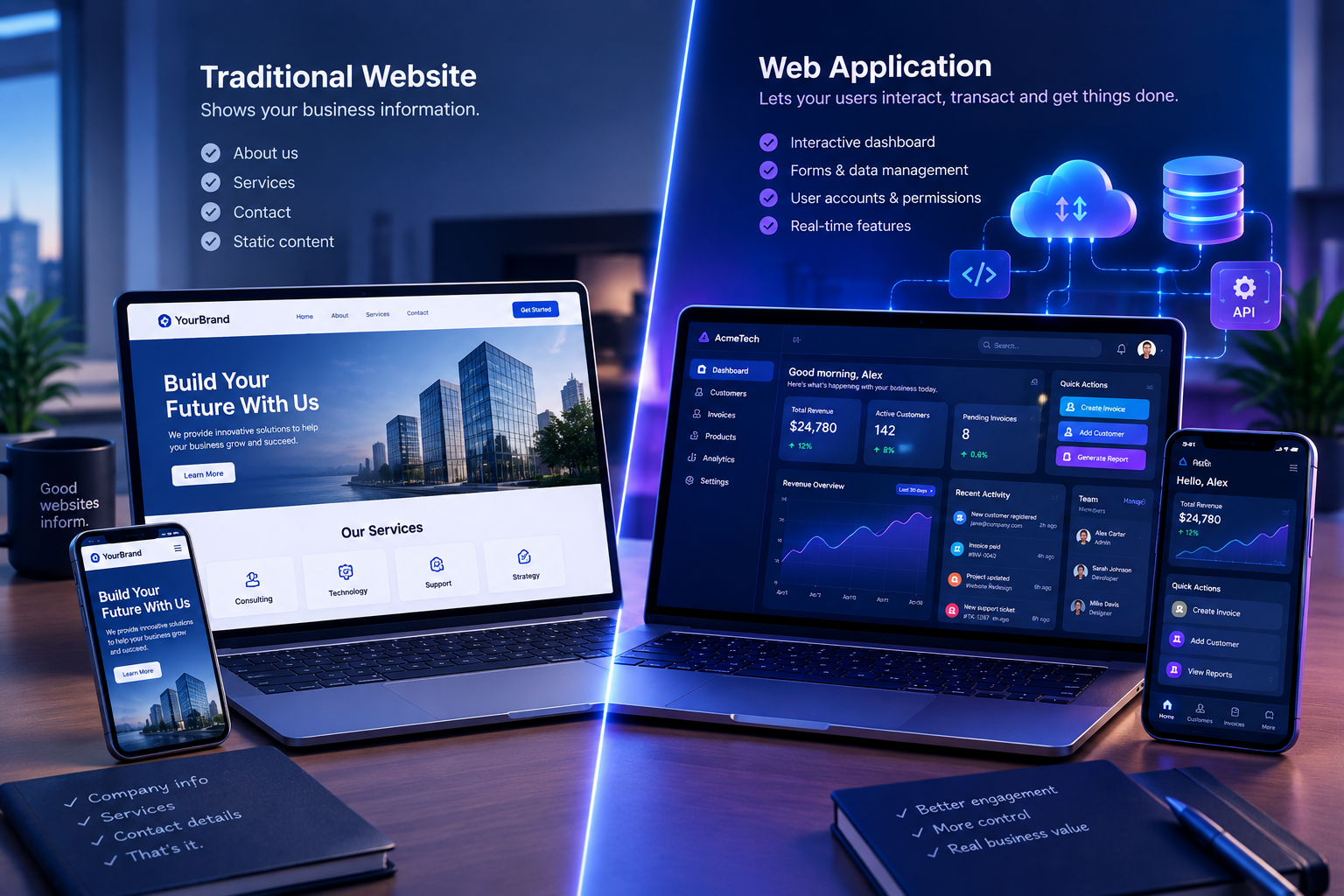
A website and a web application may appear similar because both can be accessed through a web browser. However, they are designed to serve different purposes.
A traditional website mainly provides information to visitors. A web application, on the other hand, allows users to interact with software, submit information, manage data, complete tasks, and access personalized features.
Understanding the difference between a web app and a website is important for business owners, founders, entrepreneurs, and organizations planning their digital presence.
Choosing the wrong solution can lead to unnecessary expenses, poor user experience, limited functionality, or difficulties scaling your business.
In this guide, we will explain:
- What a website is
- What a web application is
- The main differences between websites and web apps
- Examples of websites and web applications
- The benefits of each solution
- Website and web app development costs
- How to choose the right option for your business
What Is a Website?
A website is a collection of web pages published on the internet and accessed through a web browser.
Websites are commonly created to share information, promote a business, publish content, display products, or help visitors understand a brand.
Most traditional websites focus on presenting information to users rather than allowing them to perform complex tasks.
Examples of Websites
Common examples of websites include:
- Business websites
- Personal portfolios
- Blog websites
- News websites
- Company information pages
- Landing pages
- Event websites
- Online magazines
- Restaurant websites
- Service-based business websites
For example, a company website may contain the following pages:
- Home
- About Us
- Services
- Portfolio
- Blog
- Contact
The primary purpose of this type of website is to inform visitors and encourage them to take an action, such as making an enquiry, booking a consultation, or purchasing a service.
What Is a Web Application?
A web application is a software application that runs through a web browser.
Unlike a traditional website, a web application is designed to allow users to interact with data, tools, systems, and business processes.
Users may need to log in, create an account, submit forms, manage records, generate reports, process payments, or perform other tasks.
Web applications usually include a frontend interface, backend logic, databases, APIs, and authentication systems.
Examples of Web Applications
Examples of web applications include:
- Online banking platforms
- Customer relationship management systems
- Accounting platforms
- Learning management systems
- Project management tools
- E-commerce dashboards
- Booking platforms
- Employee management systems
- SaaS products
- Online payment systems
- Inventory management software
- Customer portals
For example, a financial management web application may allow a business owner to:
- Create an account
- Connect financial accounts
- Upload transaction records
- Categorize expenses
- Generate financial reports
- Manage team members
- Export accounting data
These functions go beyond simply displaying information. They require software logic, data processing, user permissions, and often database integration.
Website vs. Web App: The Main Difference
The simplest way to understand the difference is this:
A website primarily informs visitors, while a web application allows users to perform tasks and interact with software.
There can be overlap between the two. Modern websites may include interactive features, and web applications may contain informational pages.
The difference is usually determined by the primary purpose and level of functionality.
| Feature | Website | Web Application | |---|---|---| | Main purpose | Provide information | Enable users to perform tasks | | User interaction | Usually limited | Usually extensive | | Login system | Optional | Often required | | Database usage | May be limited | Usually important | | Personalized experience | Limited or moderate | Common | | Complexity | Low to high | Moderate to very high | | Data processing | Usually limited | Often extensive | | User dashboards | Not always included | Common | | Business workflows | Limited | Frequently supported | | Development cost | Often lower | Often higher | | Maintenance needs | Usually simpler | Often more complex | | Examples | Portfolio, blog, company site | Banking platform, SaaS tool, CRM |
Key Differences Between Websites and Web Applications
1. Purpose and Functionality
The main purpose of a website is to communicate information.
A business website may explain what a company does, display its services, show previous projects, and provide contact information.
A web application is designed to help users complete specific tasks.
For example, a website may explain how an accounting service works, while a web application may allow users to:
- Record transactions
- Reconcile accounts
- Generate reports
- Track invoices
- Manage expenses
- Invite team members
The website promotes the service. The web application delivers the actual software functionality.
2. User Interaction
Traditional websites are often designed for browsing and reading.
Visitors may click links, view images, submit contact forms, or navigate between pages. However, the interaction is usually relatively simple.
Web applications are more interactive. Users may:
- Drag and drop files
- Create and edit records
- Filter large datasets
- Generate reports
- Manage account settings
- Send messages
- Make payments
- Collaborate with other users
- Track progress in real time
The more a platform allows users to manipulate data and perform workflows, the more likely it is to be considered a web application.
3. Authentication and User Accounts
A website may not require users to create accounts.
For example, visitors can usually read a blog, browse a company portfolio, or view a service page without logging in.
Web applications commonly use authentication because they provide personalized features or access to private information.
Authentication may include:
- Email and password login
- Social login
- Two-factor authentication
- Single sign-on
- Role-based access control
- Password recovery
- Session management
For example, an online banking platform must identify users before displaying account balances or processing transactions.
4. Database Integration
Many websites can operate with limited database functionality.
A blog may use a content management system to store posts, authors, categories, and comments. A business website may use a database to manage contact form submissions.
Web applications often depend heavily on databases.
A web application may store:
- User profiles
- Orders
- Payments
- Financial transactions
- Product records
- Customer information
- Employee details
- Project data
- Reports
- User activity
The application retrieves, processes, updates, and protects this information based on user actions and business rules.
5. Personalization
Most informational websites display similar content to many visitors.
A web application can provide a personalized experience based on a user's account, permissions, preferences, and activity.
For example, two users accessing the same project management platform may see different dashboards because they belong to different teams or have different permissions.
Personalization may include:
- Custom dashboards
- Saved preferences
- User-specific recommendations
- Personalized reports
- Account history
- Permission-based features
- Customized notifications
6. Business Logic
A traditional website may contain basic logic, such as contact form validation or search functionality.
A web application often includes complex business logic.
For example, an e-commerce web application may need to:
- Check product availability
- Calculate shipping fees
- Apply discount codes
- Calculate taxes
- Process payments
- Update inventory
- Send order confirmations
- Generate invoices
Each step requires rules, integrations, data processing, and error handling.
7. Development Complexity
A simple website can often be developed using a content management system, a website builder, or a lightweight custom frontend.
A web application usually requires more extensive planning and engineering.
Development may involve:
- Frontend development
- Backend development
- Database design
- API development
- Authentication
- Authorization
- Payment integrations
- Data validation
- Security controls
- Automated testing
- Hosting infrastructure
- Monitoring
- Backup systems
This does not mean every website is simple or every web application is complex. A large media website can be more technically demanding than a small web application.
However, web applications generally require more functionality beyond content presentation.
Examples of Websites and Web Applications
Understanding practical examples can make the distinction clearer.
Example 1: Business Website
A company that provides software development services may need a website containing:
- Company information
- Service descriptions
- Case studies
- Testimonials
- Blog articles
- Contact details
- Consultation booking form
The website helps the company build credibility, attract visitors, and generate leads.
Example 2: Customer Management Web Application
The same company may also need an internal customer management platform.
The platform could allow employees to:
- Add new customers
- Track leads
- Assign tasks
- Record communication
- Manage sales stages
- Generate reports
- Set reminders
This is a web application because it enables users to manage business processes and data.
Example 3: E-commerce Website and Store Management App
An online store may have a public-facing website where customers can:
- Browse products
- Read product descriptions
- View prices
- Add items to a cart
- Place orders
The store may also include a private administration web application where business owners can:
- Add products
- Update prices
- Manage inventory
- Process orders
- View sales reports
- Manage staff accounts
The public storefront and the administrative dashboard may be part of the same overall platform, but they serve different purposes.
Example 4: Learning Website and Learning Management System
A learning website may publish educational articles, videos, and free resources.
A learning management system, or LMS, may allow users to:
- Register for courses
- Track lessons
- Submit assignments
- Take quizzes
- View grades
- Download certificates
- Monitor learning progress
The LMS is a web application because it supports user accounts, data storage, and interactive learning workflows.
Benefits of a Website
A website can provide significant value to a business or organization.
1. Builds Online Credibility
A professional website helps visitors understand who you are, what you offer, and why they should trust your business.
It can include:
- Company information
- Testimonials
- Portfolio projects
- Customer reviews
- Certifications
- Case studies
- Contact information
2. Improves Visibility
A website can help your business appear in search engine results when potential customers search for relevant products or services.
With effective search engine optimization, a website can attract visitors without relying entirely on paid advertising.
3. Generates Leads
A well-designed website can encourage visitors to:
- Submit an enquiry
- Book a consultation
- Request a quotation
- Subscribe to a newsletter
- Download a resource
- Call the business
4. Supports Marketing Campaigns
A website provides a destination for visitors from:
- Search engines
- Social media
- Email marketing
- Online advertisements
- Business directories
- Referral campaigns
5. Usually Requires Less Functionality
A basic business website may not need complex user accounts, advanced databases, or extensive backend workflows.
This can make it easier to launch and maintain, depending on the design and features required.
Benefits of a Web Application
A web application can support more advanced business operations and customer experiences.
1. Automates Repetitive Tasks
Web applications can reduce manual work by automating business processes.
For example, a business application may automatically:
- Generate invoices
- Send payment reminders
- Update records
- Create reports
- Notify team members
- Reconcile transactions
- Track customer activity
2. Centralizes Business Data
Instead of storing information across spreadsheets, emails, and separate systems, a web application can bring data into one platform.
Centralized data can improve:
- Collaboration
- Reporting
- Data consistency
- Access control
- Operational visibility
3. Supports Remote Access
Because web applications run through browsers, authorized users can often access them from different locations and devices.
This is useful for:
- Remote teams
- Distributed businesses
- Customer portals
- Online education
- Cloud-based software
- Multi-branch organizations
4. Improves Customer Experience
A web application can provide customers with self-service tools.
Customers may be able to:
- Track orders
- Manage subscriptions
- Download invoices
- Update account details
- Submit support requests
- Book appointments
- View transaction history
5. Enables Scalable Software Products
Many Software as a Service, or SaaS, businesses deliver their products through web applications.
A web application can support multiple users, subscription plans, permissions, integrations, and automated workflows.
Can a Website Become a Web Application?
Yes. A website can evolve into a web application as more interactive features are added.
For example, a company may initially launch a website with:
- Home page
- About page
- Services page
- Contact form
Later, the company may add:
- User registration
- Customer dashboards
- Online payments
- Booking systems
- File uploads
- Account management
- Personalized reports
At this stage, the platform may function as both a website and a web application.
This is common for growing businesses. They may begin with an informational website and gradually introduce software features as customer needs increase.
Website vs. Web App: Which One Does Your Business Need?
The right choice depends on your business goals, audience, budget, and required functionality.
Choose a Website If:
A website may be suitable if your main goals are to:
- Establish an online presence
- Explain your services
- Promote your brand
- Publish content
- Display your portfolio
- Generate enquiries
- Improve search visibility
- Support marketing campaigns
Examples include:
- A consulting firm
- A restaurant
- A creative agency
- A local service provider
- A personal brand
- A small business
- A professional portfolio
Choose a Web Application If:
A web application may be more suitable if users need to:
- Log in to an account
- Manage private information
- Complete complex tasks
- Process transactions
- Generate reports
- Collaborate with others
- Access personalized dashboards
- Use business automation tools
- Manage large amounts of data
Examples include:
- A fintech platform
- A SaaS product
- A customer portal
- An accounting system
- An LMS
- A booking platform
- An inventory management system
- A project management tool
You May Need Both
Many businesses need both a website and a web application.
The website serves as the public-facing marketing and information platform.
The web application provides secure functionality for customers, employees, partners, or administrators.
For example:
- The website attracts customers.
- The web application serves registered users.
- The admin dashboard helps employees manage operations.
- The backend connects the different systems.
This combination can create a complete digital ecosystem for a business.
Website and Web App Development Costs
The cost of development depends on the features, design, technology, integrations, security requirements, and development process.
There is no universal price for either a website or a web application.
Factors That Affect Website Cost
Website development costs may depend on:
- Number of pages
- Design complexity
- Content creation
- Responsive design requirements
- CMS selection
- SEO setup
- Contact forms
- E-commerce functionality
- Third-party integrations
- Hosting and maintenance
A simple landing page will generally require less work than a large e-commerce website with hundreds of products and multiple integrations.
Factors That Affect Web App Cost
Web application development costs may depend on:
- Number of user roles
- Frontend complexity
- Backend architecture
- Database design
- Authentication requirements
- API integrations
- Payment processing
- Real-time functionality
- Reporting and analytics
- Security controls
- Cloud infrastructure
- Testing and monitoring
- Ongoing maintenance
A small booking application may be less complex than a banking platform or enterprise resource planning system.
Illustrative Project Categories
| Project Type | Typical Complexity | |---|---| | Simple landing page | Low | | Small business website | Low to moderate | | Corporate website | Moderate | | Content-driven website | Moderate | | E-commerce website | Moderate to high | | Customer portal | Moderate to high | | Booking web application | Moderate to high | | SaaS platform | High | | Financial management system | High | | Enterprise business application | Very high |
The best way to estimate the cost is to define the required features and obtain a project-specific technical proposal.
Technologies Used to Build Websites and Web Applications
Both websites and web applications can use similar technologies, but web applications often require a broader technical architecture.
Common Website Technologies
Website development may involve:
- HTML
- CSS
- JavaScript
- WordPress
- Webflow
- Shopify
- React
- Next.js
- PHP
- Content management systems
Common Web Application Technologies
Web applications may involve:
- HTML, CSS, and JavaScript
- React, Vue, or Angular
- Next.js
- Python
- Django
- Flask
- FastAPI
- Node.js
- PHP
- Laravel
- Java and Spring Boot
- C# and ASP.NET Core
- PostgreSQL
- MySQL
- MariaDB
- Redis
- REST APIs
- GraphQL
- Docker
- Cloud hosting platforms
The technology stack should be selected based on the product requirements, expected traffic, security needs, development timeline, budget, and long-term maintenance plan.
Important Considerations Before Choosing
Before deciding between a website and a web application, consider the following questions.
1. What Is Your Main Business Goal?
Do you want to promote your business, publish information, generate leads, or deliver software functionality?
Your primary goal will influence the type of platform you need.
2. Will Users Need Accounts?
If users need private dashboards, saved data, or personalized features, a web application may be required.
3. Will You Store and Process Data?
If your platform needs to manage transactions, orders, customer records, or reports, you will likely need a more advanced application architecture.
4. Do You Need Automation?
If you want to automate workflows, notifications, reports, payments, or business operations, a web application may be the better fit.
5. What Is Your Budget?
A basic website may be more affordable to launch, while a web application may require greater investment in design, development, testing, infrastructure, and maintenance.
6. Will the Platform Grow Over Time?
If you expect to introduce user accounts, payments, dashboards, or automation later, your initial architecture should allow for future expansion.
7. What Are Your Security Requirements?
Platforms handling financial, personal, or confidential information require stronger security controls than a simple informational website.
Common Mistakes Businesses Make
Mistake 1: Building Only a Website When a Web App Is Needed
Some businesses create an attractive website but later discover that their customers need dashboards, automation, account management, or online transactions.
Solution: Identify the required user workflows before development begins.
Mistake 2: Building a Complex Web App Without Validating the Idea
A business may invest heavily in software before confirming that customers need the product.
Solution: Start with a clearly defined Minimum Viable Product, or MVP, and validate the most important features first.
Mistake 3: Focusing Only on Appearance
Design is important, but a platform must also be usable, secure, fast, and reliable.
Solution: Balance visual design with functionality, performance, accessibility, and security.
Mistake 4: Ignoring Mobile Users
Many users access websites and web applications through smartphones.
Solution: Make the platform responsive and test it across different screen sizes.
Mistake 5: Underestimating Maintenance
Launching a website or web application is not the end of the project.
Solution: Plan for updates, backups, security monitoring, bug fixes, performance improvements, and feature enhancements.
Frequently Asked Questions
Is a web application the same as a website?
No. A web application is a type of browser-based software designed for interaction and task completion. A traditional website mainly provides information, although modern websites can include application-like features.
Is Facebook a website or a web application?
Facebook has public website features, but its core platform functions as a web application because users can log in, communicate, publish content, manage profiles, and interact with personalized data.
Is an online store a website or a web application?
An online store can be both. The public storefront may function as a website, while shopping carts, customer accounts, order management, payment processing, and administrative dashboards involve web application functionality.
Is WordPress a website or a web application?
WordPress is a content management system used to build websites and other digital experiences. A WordPress website can also include web application features through plugins, custom development, user accounts, databases, and integrations.
Which is more expensive, a website or a web application?
A web application is often more expensive because it may require advanced functionality, backend logic, databases, authentication, integrations, testing, and security controls. However, the actual cost depends on the scope of the project.
Can a web application work on mobile devices?
Yes. Many web applications are designed to be responsive and work on smartphones, tablets, and desktop computers. Some can also support Progressive Web App features.
Do I need both a website and a web application?
You may need both if your business requires a public marketing platform and a separate system for registered users, customers, employees, or partners.
Final Thoughts
The difference between a website and a web application comes down to purpose, functionality, interaction, and the type of experience you want to provide.
A website is usually focused on presenting information, building credibility, attracting visitors, and generating leads.
A web application is designed to help users perform tasks, manage information, access personalized features, and interact with software.
For many businesses, the right solution may be a combination of both. A professional website can attract and educate customers, while a web application can deliver the tools and services customers need.
Before starting development, define your business objectives, understand your users, identify the required features, and choose a technical architecture that supports your long-term goals.
If you need help deciding whether your business requires a website, a web application, or a complete digital platform, Zeecomedia can help.
Visit Zeecomedia to explore our website development, custom software development, AI solutions, business automation, and digital transformation services.